
Beta Industries
PrestoConnect Software for the BetaColor Presto Spectro (Spectro-Densitometer)
- Weight:
- 1 LBS
- Shipping:
- Calculated at Checkout


Description
PrestoConnect™ Color Library Software
Unlock the Full Potential of Your BetaColor Presto Spectro
Unlimited Colors | Job Management | QC Reporting | Pass/Fail Analysis
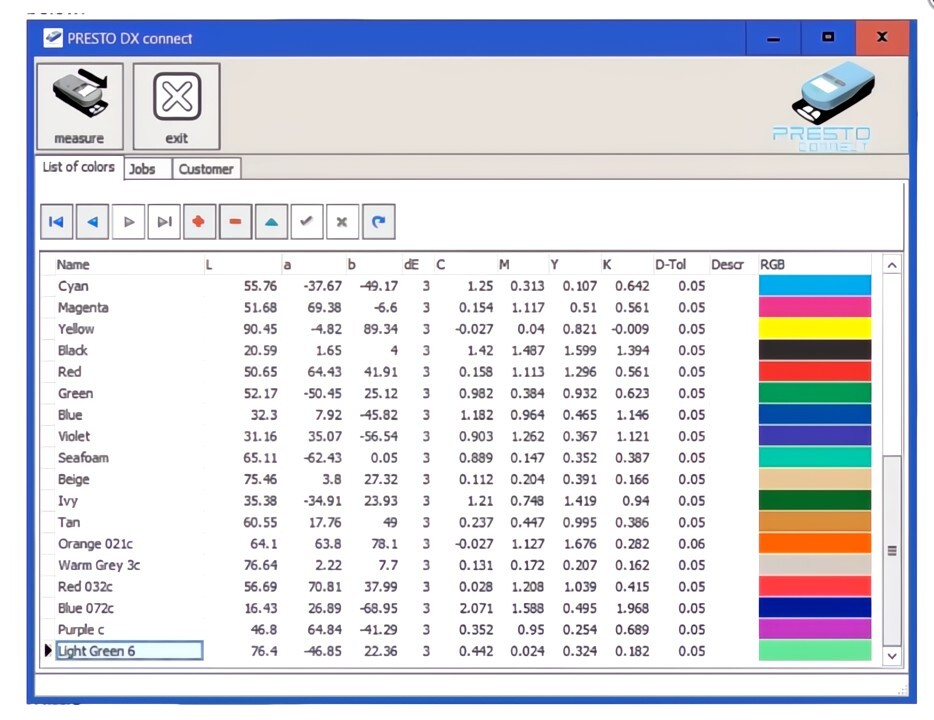
Move beyond the limitations of internal memory.
The PrestoConnect Database Software transforms your handheld spectro into a complete Quality Control station. Expand your library from 32 onboard colors to over 30,000 uniquely stored references, organized by Customer and Job.
Unlimited Storage
Never worry about running out of space. While the handheld unit stores 32 colors, PrestoConnect allows you to save, categorize, and recall over 30,000 color standards directly from your PC.
Job & Client Management
Stop searching through unorganized lists. This software allows you to file specific colors under Customer Name and Job ID, making it easy for production personnel to find the exact target instantly.
Precise Color Data
Automatically captures Lab and Density values along with user-defined Delta E tolerances. A visual representation of the color is generated on-screen for immediate confirmation.
How It Works
Physical samples are measured with the instrument and automatically written to the database. The operator enters a color name, sets the tolerances, and views a digital representation of the color before saving.
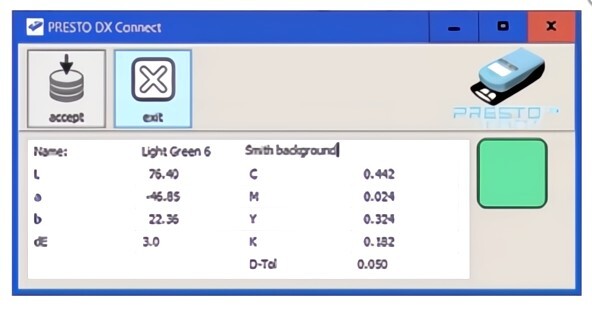
Once accepted, the color becomes part of your Master List. You can sort, filter, and upload these standards back to the BetaColor Presto Spectro unit for use on the press floor.
System Requirements
- Hardware: BetaColor Presto Spectro
- OS: Windows 7, 8, 10, 11
- Connection: USB Cable (Included with Spectro)
Download User Manual
Related Products
Related Products


BetaColor Presto Densitometer
Beta Industries

BetaColor Viewer 3 Magnetic Lens Plate
Beta Industries